Coupons - Feature Overview
What are Coupon Codes?
Coupon codes are only available for those collecting payments through CrowdFiber. The discount amount will only apply to reduce a deposit payment required at the time of order submission.
How to Create a Coupon Code:
-
Go to Engagement on the left-hand rail of your Admin Dashboard
-
Click Coupon Codes
-
Click create New Coupon Code
-
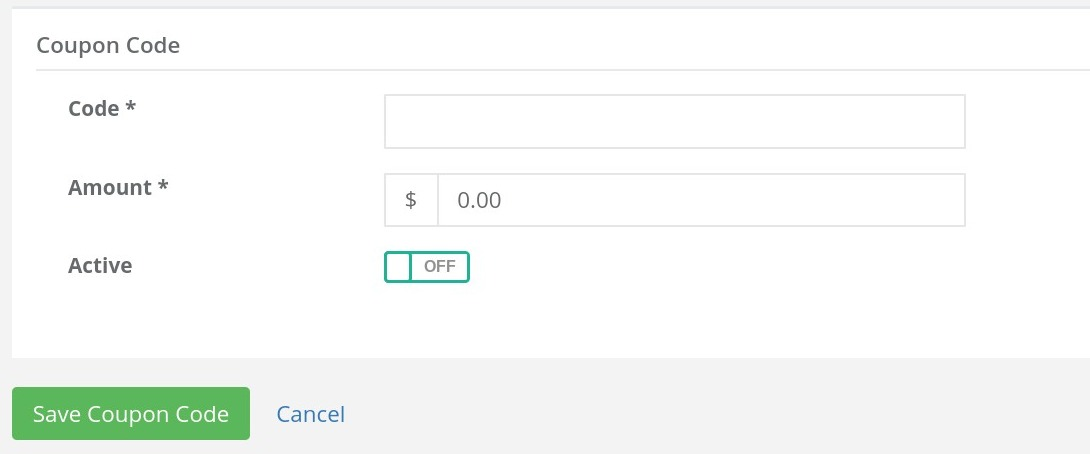
Add the Code name
- This is what will be entered by the user to apply the discount.
-
Add the Amount
- This is a flat-rate amount that will be reduced from any required deposit based on zone and product selection settings.
-
Set the coupon to Active to ON to enable the code to be applied.
Track Coupon Usage
Return to the main Coupon page to see which coupons are active and how many times they have been used.
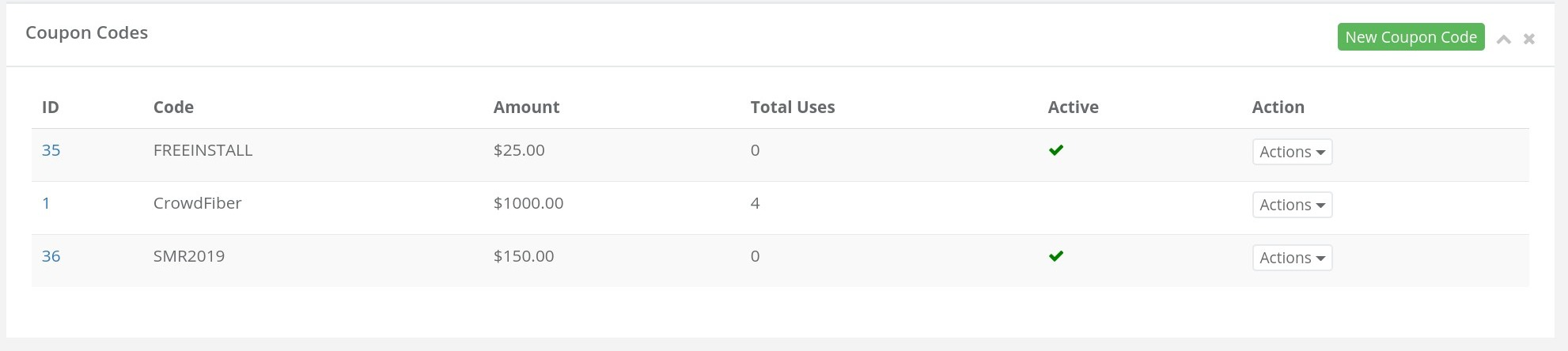
You can also filter orders by coupon code to see where they were applied.
Coupon Helpful Hints
- Coupon codes do NOT apply to product pricing within the bundle builder at this time.
- They are not able to be scoped to particular zones; however, you may choose to distribute certain codes in specific places or through specific channels.
- Coupon codes are great ways to encourage sign-ups by charging an install fee but offering a code to waive it if ordered within a certain time period.
- Coupon codes can also be used to track the effectiveness of certain communication channels if you are charging deposits. Even $5 off can provide an incentive for users to input the code.