How Do I Get a Link for an Update?
Have you recently posted an update on CrowdFiber and want to share it on social media, email, or elsewhere on the internet? CrowdFiber allows you to access the specific link for all of your administrative updates for sharing across the web.
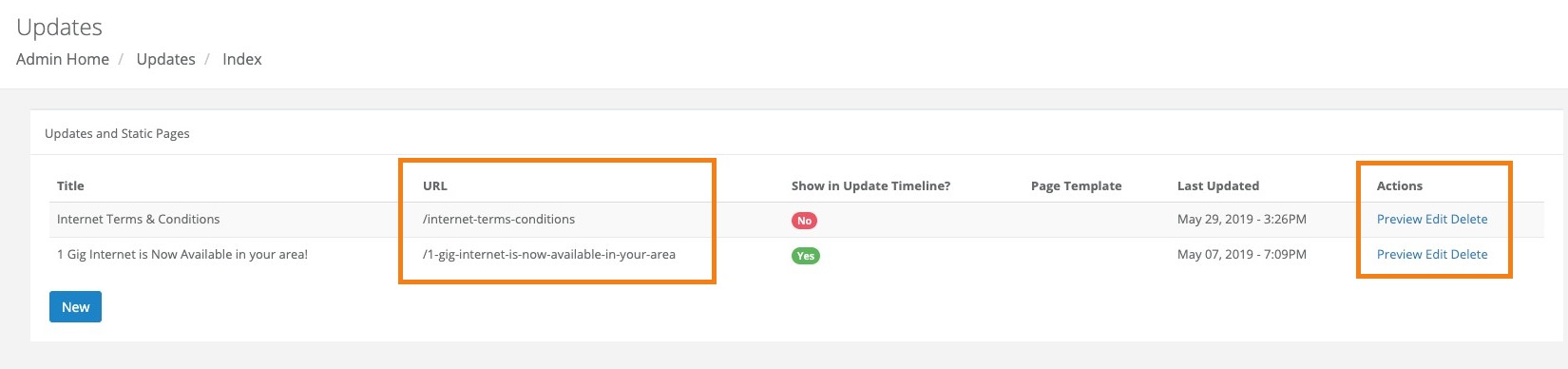
In the left-hand rail of your Admin Dashboard, click Engagements > Updates. Here you will see an index of your updates, with several columns displaying each update's attributes. You can access the URL of an update in two ways:
- In the Actions column on the right-hand side of the index, click Preview for the update you'd like to share. This will open the update in a new tab, and the URL displayed in your browser can be copied and shared.
- Look in the URL column of the update you'd like to share. The value displayed here shows you ONLY the custom portion of the URL that is unique to that update; accordingly, you will still need to put your CrowdFiber site name in front of this value to create a functioning address.