What are postcard specs?
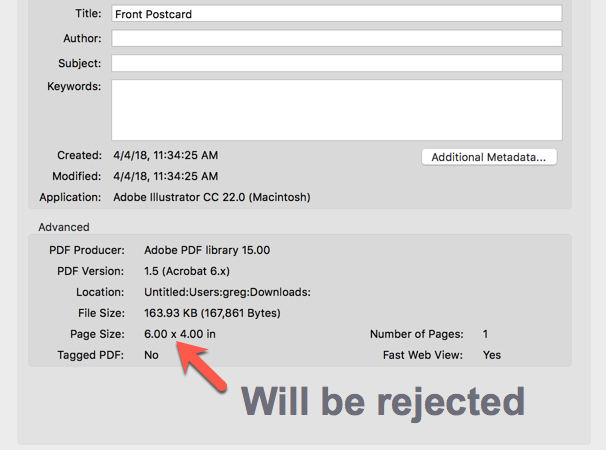
To ensure that you are producing high quality postcards that will be printed and delivered successfully, please make use of the attached templates and follow the guidelines below:
- Make sure all fonts are embedded.
- Generated PDF's need to be PDF/A compliant.
-
Don't include front and back in the same file. Provide a separate file formatted as “front.pdf”
and “back.pdf” with additional filename descriptors as desired. Note: “back.pdf” is always the side configured for addresses and postage. * The white section on the postcard back is a blank area that is used for the Return and To addresses. Do not place anything in this area. * Images used in your PDF(s) should be 300 dpi or higher - PNG/JPEG files with less than 300 dpi will be rejected. * Your artwork should include a 1/8" border (sometimes called "bleed") around the final trim size. This means your final file size will be a total of 0.25" larger than your expected printed piece (ie, a 4"x6" postcard should be submitted as 4.25"x 6.25" ). * If you are working in Adobe Acrobat, you can click File/Properties before submitting your artwork/PDF - unless the Page Size shows 4.25x6.25, your design is not ready to submit and will be rejected.