Can I Change How Uptake is Calculated?
Broadband planning and deployment depend on your ability to reach uptake goals. We empower you to calculate your uptake in many different ways.

The Difference Between Progress and Uptake
Broadly, the fundamental difference between progress and uptake is how close a zone is to reaching a goal vs. how close a zone is to reaching every available address in a particular geographic area.
Progress = Actual/Goal
Uptake = Orders/Addresses
Uptake Calculation
By default, zone uptake will calculate the percentage of orders you have vs. the total addresses in that defined geographic region.
You can change uptake calculations to meet your particular needs. Here's how:
-
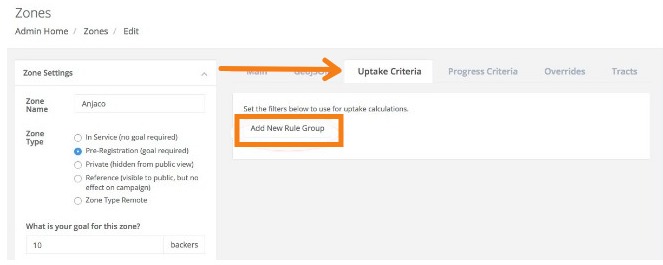
Go to Zones and select a zone that you want to convert. Open the Uptake Criteria tab and click Add New Rule Group.
-
Choose from the available conditions and then select which criteria makes sense for you.
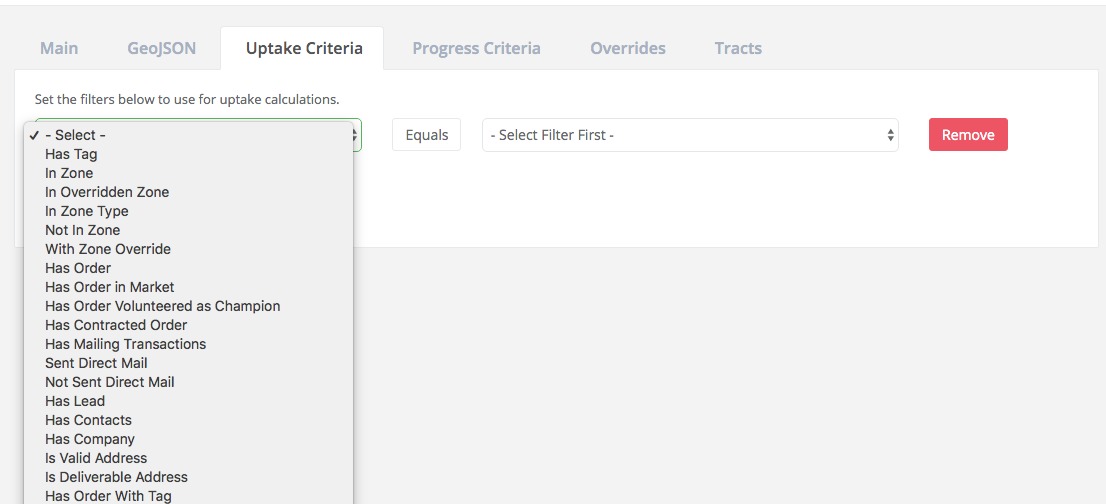
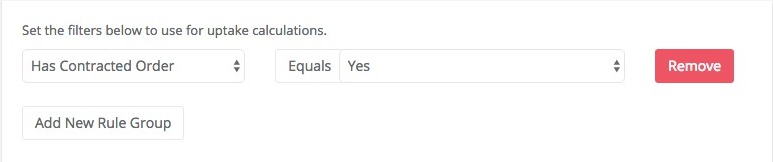
Not all of these might be relevant options, but you are free to use whatever makes sense for you. For example, if you'd rather calculate uptake by only Contracted Orders , then your rule will look like this:
-
Save the Zone Setting.
-
Proceed to set other zone overrides as needed.
-
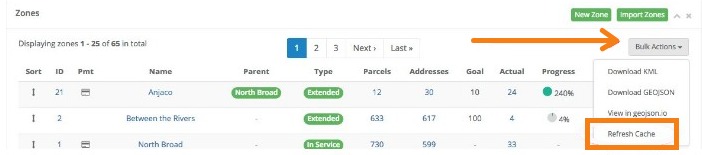
Finally, return to the zone dashboard and click on Bulk Actions. Chose Refresh Cache to update the calculated values.
Why Would I Change Zone Uptake Calculations?
There may be several business cases that would be best served with a change from the default calculation. The most common reasons are:
-
Moving from interest survey to order taking
In the initial survey of interest, you may not have requested that customers select products, or you may not have asked for a full commitment of service. However, once you are actively campaigning in an area in advance or response to a build-out, you need to see those orders that have reconverted - customers that have selected products and accepted service with a contract.
In this very common case, you would want uptake to be calculated by Contracted Order rather than just sign-ups. Contracted is a flag on an order which can be manually flagged as a part of your order workflow (contract signed and returned to your facility) or this can be dynamically flagged if you are using our Signature module to provide and receive signed contracts electronically through CrowdFiber.
-
The requirement to have % of member orders vs. non-member orders
If you need to meet a membership uptake requirement and you are collecting orders from both members and non-members, then you can modify uptake to be calculated by Service Active=Yes, Account=Yes, or Market=Member based on how you configured your data. Or, if you utilized a dynamic tag at import to identify your members, then you could set uptake to be based on only those orders that have this tag.
Hopefully, this customization allows you better real-time management and analysis to reach your necessary business and finance goals.